HTML from scratch: How to set website encoding in HTML. Lesson #20
When creating a website, it’s important to immediately set the website encoding. Without it, text may display incorrectly: letters turn into strange symbols.
In this lesson from the HTML from scratch series, we cover only what’s necessary: what encoding is and how to correctly set website encoding in HTML.
What website encoding is
Encoding is how the browser understands which letters to show on the page.
If encoding is incorrect or missing, the browser will show the wrong text.
Which encoding to use
For all modern websites, use UTF-8.
It works for:
-
Ukrainian text;
-
Russian text;
-
English text;
-
symbols and emojis.
Other encodings are almost never used today.
How to set website encoding in HTML
Encoding is set inside the <head> tag.
<!DOCTYPE html>
<html lang="en">
<head>
<meta charset="UTF-8">
<title>Website Encoding</title>
</head>
<body>
<p>Text displays correctly</p>
</body>
</html>
If this tag is present, the browser knows how to read the file.
What happens if encoding is incorrect
For example, you wrote:
Hello! This is my website.
But the browser shows:
Привет! Ðто мой Ñайт.
Or even:
������! ��� ��� ����.
This is what a website with wrong encoding looks like.
Common mistakes
Mistake 1. Using old encodings
<meta http-equiv="Content-Type" content="text/html; charset=windows-1251">
Mistake 2. Encoding not in <head> (The browser may ignore it)
<body>
<meta charset="UTF-8">
Mistake 3. File not saved in UTF-8
Even if HTML says UTF-8, the file itself must also be saved in that encoding.
How to save the file correctly in Notepad
Even if HTML has UTF-8, the file must be saved in the same encoding.
How to save HTML in standard Notepad (Windows)
-
Click File → Save As
-
In Save as type select All Files
-
Name the file, e.g.,
index.html -
In Encoding select UTF-8
-
Click Save
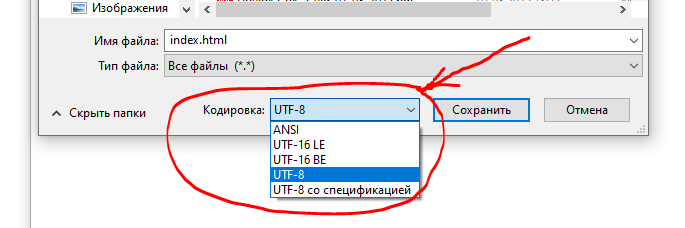
After that, the browser will read the file correctly, and the text will not turn into strange symbols.
Conclusion
Every HTML file should include:
<meta charset="UTF-8">
Without it, text may break. With it, there will be no display issues.
Latest posts in this category
-
 Knowledge Check: HTML Basics Test
159
Knowledge Check: HTML Basics Test
159
-
 HTML from Scratch: Adding Audio and Video to Your Website — For Beginners. Lesson #26
206
HTML from Scratch: Adding Audio and Video to Your Website — For Beginners. Lesson #26
206
-
 HTML from Scratch: The download Attribute in HTML5 (for downloading files). Lesson #25
281
HTML from Scratch: The download Attribute in HTML5 (for downloading files). Lesson #25
281
-
 HTML from Scratch: Commenting in HTML. Lesson #24
686
HTML from Scratch: Commenting in HTML. Lesson #24
686
-
 HTML from Scratch: The DOCTYPE Tag. Lesson #23
250
HTML from Scratch: The DOCTYPE Tag. Lesson #23
250
Popular posts
 HTML from Scratch: Anchor Links in HTML. Lesson #7 10962
  HTML from Scratch: How to Create a Horizontal Line in HTML. Lesson #10 1659
  HTML from Scratch: How to Add Links in HTML. Lesson #6 741
  HTML from Scratch: Basics for Beginners. Lesson #1 736
  HTML from Scratch: Commenting in HTML. Lesson #24 686
Leave a Reply