Adding Meta Description and Keywords in WordPress
Brief explanation of the code:
- Adding meta boxes to the editor: Two meta boxes are created in the admin panel — for entering meta description and meta keywords.
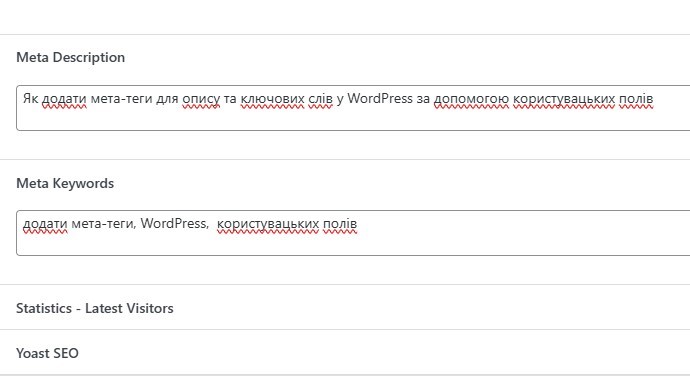
- Saving data: When the user saves a post or page, the entered meta description and meta keywords are stored in the database.
- Outputting meta tags: Meta tags for description and keywords are added to the
<head>of posts and pages if the corresponding data exists.

Each function performs its role in creating, saving, and displaying meta information to improve the site’s SEO.
(functions.php)
// Function to add a meta box for Description in the post and page editor
function add_meta_box_description() {
    add_meta_box(
        'meta_description', // Meta box ID
        'Meta Description', // Meta box title
        'custom_meta_description_callback', // Callback function that will display the form
        ['post', 'page'], // Content types to which the meta box will be added (posts and pages)
        'normal', // Position of the meta box (usually 'normal' for standard placement)
        'high' // Priority of the meta box display
    );
}
add_action('add_meta_boxes', 'add_meta_box_description'); // Hook the function to the add_meta_boxes action

// Callback function to display the meta description field
function custom_meta_description_callback($post) {
    // Get the saved meta description value from the database
    $description = get_post_meta($post->ID, '_meta_description', true);
    // Display the input field for the meta description
    echo '<textarea style="width:100%" name="meta_description">' . esc_textarea($description) . '</textarea>';
}

// Function to save the meta description when saving a post or page
function save_meta_description($post_id) {
    // Check if the meta_description value is set in the POST request
    if (isset($_POST['meta_description'])) {
        // Save the meta description to the database with sanitization
        update_post_meta($post_id, '_meta_description', sanitize_text_field($_POST['meta_description']));
    }
}
add_action('save_post', 'save_meta_description'); // Hook the function to the save_post action

// Function to add a meta box for Keywords in the post and page editor
function add_meta_boxes_keywords() {
    add_meta_box(
        'meta_keywords', // Meta box ID
        'Meta Keywords', // Meta box title
        'custom_meta_keywords_callback', // Callback function that will display the form
        ['post', 'page'], // Content types (posts and pages)
        'normal', // Position of the meta box
        'high' // Priority of the meta box display
    );
}
add_action('add_meta_boxes', 'add_meta_boxes_keywords'); // Hook the function to the add_meta_boxes action

// Callback function to display the meta keywords field
function custom_meta_keywords_callback($post) {
    // Get the saved meta keywords from the database
    $keywords = get_post_meta($post->ID, '_meta_keywords', true);
    // Display the input field for the meta keywords
    echo '<textarea style="width:100%" name="meta_keywords">' . esc_textarea($keywords) . '</textarea>';
}

// Function to save the meta keywords when saving a post or page
function save_meta_keywords($post_id) {
    // Check if the meta_keywords value is set in the POST request
    if (isset($_POST['meta_keywords'])) {
        // Save the meta keywords to the database with sanitization
        update_post_meta($post_id, '_meta_keywords', sanitize_text_field($_POST['meta_keywords']));
    }
}
add_action('save_post', 'save_meta_keywords'); // Hook the function to the save_post action

// Function to add meta tags to the <head> section for individual posts and pages
function add_meta_tags() {
    if (is_singular(['post', 'page'])) { // Check if it's a single post or page
        // Get the meta description and meta keywords
        $meta_description = get_post_meta(get_the_ID(), '_meta_description', true);
        $meta_keywords = get_post_meta(get_the_ID(), '_meta_keywords', true);

        // If the meta description is not empty, output the <meta name="description">
        if (!empty($meta_description)) {
            echo '<meta name="description" content="' . esc_attr($meta_description) . '">' . "\n";
        }
        // If the meta keywords are not empty, output the <meta name="keywords">
        if (!empty($meta_keywords)) {
            echo '<meta name="keywords" content="' . esc_attr($meta_keywords) . '">' . "\n";
        }
    }
}
add_action('wp_head', 'add_meta_tags'); // Hook the function to the wp_head action
Latest posts in this category
-
 Activation and Initialization Hooks in WordPress: Where and When to Create Tables
291
Activation and Initialization Hooks in WordPress: Where and When to Create Tables
291
-
 How to Create a Custom Table in WordPress via functions.php: A Complete Guide to MySQL Data Types
334
How to Create a Custom Table in WordPress via functions.php: A Complete Guide to MySQL Data Types
334
-
 HTML Select: hidden placeholder, highlight, and dynamic urgency indicator
282
HTML Select: hidden placeholder, highlight, and dynamic urgency indicator
282
-
 How to Create a Custom Admin Menu in WordPress: A Simple Guide for Beginners
226
How to Create a Custom Admin Menu in WordPress: A Simple Guide for Beginners
226
-
 Customizing the WordPress Login Page: Logo, Colors, Background Image & Custom CSS
255
Customizing the WordPress Login Page: Logo, Colors, Background Image & Custom CSS
255
Popular posts
 How to Display the Visitor’s IP Address on a Website Using PHP? 669
  How to Detect an AdBlocker on Your Site Using JavaScript 373
  How to Create a Custom Table in WordPress via functions.php: A Complete Guide to MySQL Data Types 334
  How to Add a Currency Widget to the WordPress Admin Dashboard 298
  Activation and Initialization Hooks in WordPress: Where and When to Create Tables 291
Leave a Reply